Don't you just love office meetings? For many people the answer is no - because they often fail to deliver real value by lacking structure, clear intent, or the right environment. Unnecessary meetings are therefore a thief of productivity. Research from Microsoft Work Trend Index shows that employees are interrupted every two minutes – up to 275 times per day – by meetings, messages, or notifications, fragmenting focus and reducing productivity. At the same time, insights from Atlassian workplace meetings research reveal that 78% of employees feel overloaded by meetings, making it harder to get meaningful work done.
In a world shaped by hybrid work, remote work, and constant video conferencing, the ability to run an effective office meeting is now a core business skill – and that is what this article aims to help you to do.
From meeting room booking to choosing between meeting rooms, outdoor pods, and flexible meeting spaces across the UK, organisations now have a broad range of options. The challenge is no longer access to space – it is how well that space is used to support collaboration, communication, and outcomes.
Companies like Persy Booths understand this challenge through their expert team, working with organisations across London and other UK locations to create environments that reduce distractions and improve conversations.
Key takeaways from this article
- A successful office meeting depends on clear planning, the right participants, and the right meeting room
- Modern meeting rooms must support hybrid work, video calls, and screen sharing
- Strong facilitation improves collaboration, productivity, and innovation
- The right workspace – from quiet space to natural light – improves focus
- Smart booking, transparent pricing, and flexible services improve efficiency
What a great office meeting looks like today
A great office meeting today blends structure, environment, and technology. Whether teams meet in person, connect via a virtual office, or run virtual events across locations, success depends on clarity and engagement.
A successful meeting includes a clear outcome, the right attendees, and a focused discussion. Participants should know why they are invited, what they need to contribute, and what decisions are expected. The best meetings also ensure ownership – with clear next steps, deadlines, and a responsible person for each action.
Modern meeting rooms play a critical role. A well-equipped space – eg with with smart tv, camera support, screen sharing, and reliable video conferencing – ensures that teams stay connected. This is especially important in hybrid work environments, where some employees join remotely while others meet in person.
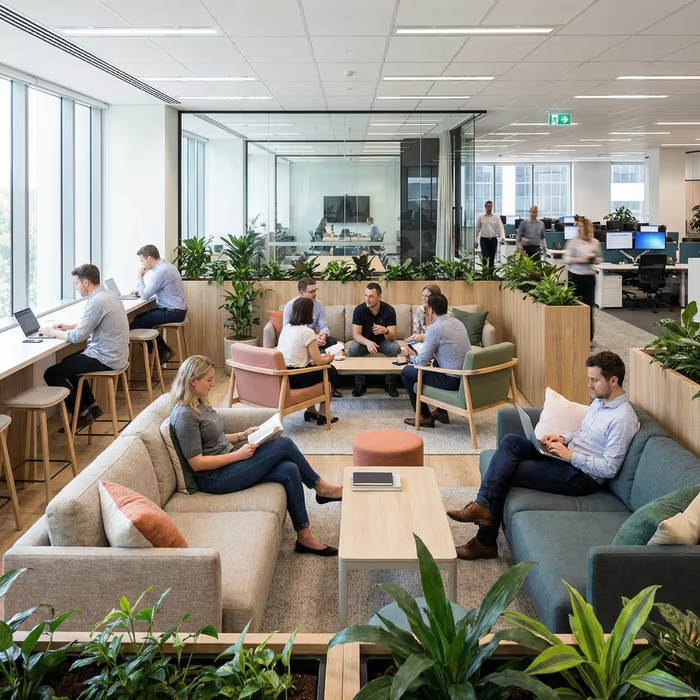
The environment matters too. Natural light, comfortable desks, and a quiet space help reduce distractions and improve productivity. Whether teams gather for an hour, a half day session, or ongoing project collaboration, the goal is to create a setting where people can focus, interact, and collaborate effectively.

The most common office meeting problems that waste time
Despite access to better meeting spaces and platforms, many office meeting sessions fail due to avoidable issues. These include no agenda, too many attendees invited, and discussions that drift without focus.
Poor meeting room booking can also cause problems – such as mismatched room size, lack of availability, or unexpected extra cost. Technical issues with video calls, screen sharing, or camera setup can delay the start and reduce engagement.
Another common issue is lack of ownership. When no person is responsible for decisions or tasks, progress is lost. Meetings may feel busy but deliver little benefit to the business.
These problems are not complex – they are habits. With better planning, preparation in advance, and the right workspace, they can be avoided. Here are our 5 steps that will guide you towards more productive and more fulfilling (and possibly less boring) office meetings.
Step 1 – Decide if the office meeting should happen
Before scheduling an office meeting, decide whether it is necessary. Not every discussion requires a meeting, and reducing unnecessary sessions protects focus and improves work life balance.
Ask whether the topic requires real-time interaction, or whether it could be handled via chat, shared documents, or another platform. Many updates can be communicated without gathering a group in a meeting room.
Reducing low-value meetings helps employees manage their schedule more effectively and improves overall productivity.
Use an office meeting “meeting test” to replace low-value meetings
A simple test can help determine whether to proceed:
- Does this require collaboration in real time?
- Do participants need to interact and discuss ideas?
- Can this be handled asynchronously instead?
Alternatives include shared workspace updates, quick chat messages, or recorded presentations. These different ways of working reduce unnecessary meetings and help teams stay focused.
Set the office meeting outcome before you invite anyone
Before sending a booking or invite, define the outcome. Whether the goal is to plan, decide, or collaborate, clarity ensures that participants arrive prepared.
This also helps determine who should attend. Only those with relevant expertise or responsibility should be invited, while others can be updated afterwards.
Step 2 – Plan the office meeting for speed and clarity
Planning turns a meeting into a productive event rather than a loose conversation. A well-planned office meeting includes a clear agenda, defined roles, and the right space.
Preparation should consider:
- The purpose and desired outcome
- The agenda and time allocation
- The meeting room or workspace
- Required technology such as video conferencing and screen sharing
- The participants and their roles
Build an office meeting agenda that drives decisions
An effective agenda creates structure and prevents discussions from drifting. It should include clear topics, time limits, and decision points.
This ensures that conversations stay focused and that meetings lead to outcomes rather than ongoing discussion.

Invite the right people to the office meeting – not everyone
Inviting the right participants is critical. Include decision-makers, contributors with expertise, and those responsible for execution.
Avoid inviting large groups unnecessarily. This reduces distractions and improves the quality of interaction.
Assign roles that keep the office meeting on track
Clear roles improve pacing and accountability:
- Facilitator to guide the discussion
- Timekeeper to manage the hour or session length
- Note-taker to capture key points
- Decision owner responsible for outcomes
For more detail, see our guide on how to set a business office meeting agenda and roles.
Step 3 – Run the office meeting like a facilitation playbook
Running an office meeting effectively requires structure and awareness.
Start the office meeting in 2 minutes with an opening script
Begin by stating the objective, agenda, and expected outcomes. This helps participants focus and ensures everyone understands their role.
Keep the office meeting focused with timeboxing and a "parking lot"
Timeboxing keeps discussions on track. If new topics arise, capture them for later rather than allowing the conversation to drift.
Get participation without letting the loudest voice win
Encourage all attendees to participate. Use structured techniques to gather ideas and ensure balanced input. This improves collaboration and leads to better decisions.

Ensure fairness when some people join remotely
Hybrid work requires careful management. Ensure remote participants can hear, interact, and contribute equally. Use shared tools and clear communication to keep everyone connected.
Step 4 – Turn every office meeting into decisions and action
The purpose of an office meeting is to create outcomes, not just conversation.
Capture office meeting decisions in a consistent notes format
Meeting notes should capture decisions, tasks, owners, and deadlines. This ensures clarity and supports follow-through.
Assign office meeting action items that get done
Each task should have a single responsible person, a clear next step, and a defined timeline. Without this, progress is lost.
Step 5 – Follow up after the office meeting
Follow-up ensures that decisions translate into action.
Send a same-day office meeting recap
Share a recap with attendees and stakeholders. This reinforces alignment and ensures everyone is aware of next steps.
Improve the next office meeting with a 60-second retro
Use quick feedback to improve future meetings. This continuous improvement approach enhances collaboration and productivity over time.
Office meeting room basics that prevent office meeting failures
The environment has a direct impact on meeting success.
Office meeting room pre-meeting setup checklist
Before the meeting:
- Confirm meeting room booking and availability
- Check room size and layout
- Ensure equipment is built, equipped, and working
- Test video conferencing, camera, and screen sharing
Reduce noise and distractions in the office meeting room
Choose a quiet space to minimise distractions. This improves focus and communication. If you are planning meetings, you should be aware of acceptable noise levels for office meetings.

Add private spaces for sensitive office meeting conversations
Some discussions require privacy. Solutions like a two person phone booth provide a dedicated space for focused conversations.

Use small team spaces for quick office meeting sessions
Smaller meeting spaces support quick collaboration, interviews, and planning sessions without blocking larger rooms. Options like the Persy Four for small team office meetings are ideal for this.
Improve office meeting habits with simple tracking
Tracking helps organisations improve meeting effectiveness over time.
Office meeting metrics that matter
Measure outcomes such as decision rate, productivity, and participant feedback to understand performance.
Audit recurring office meetings and reclaim time
Review recurring meetings regularly to ensure they still deliver value. Remove or adjust sessions that no longer support business goals.
Office meeting checklist and templates
5-minute office meeting prep checklist
- Define the outcome
- Plan the agenda
- Confirm the space
- Invite participants
Office meeting agenda template
- Objective
- Topics
- Decisions
- Next steps
Office meeting notes and recap template
- Decisions
- Actions
- Owners
- Deadlines
Office meeting room checklist
- Equipment ready
- Space prepared
- No unexpected extra cost
Conclusion
An effective office meeting is not about gathering people – it is about creating the right conditions for collaboration, communication, and progress. By combining thoughtful planning, the right meeting rooms, and strong facilitation, organisations can improve productivity, reduce wasted time, and unlock innovation.
FAQs
.avif)
Passionate, progress-driven venture & business developer with startup and corporate experience. I speak business, while keeping customers in my heart.